RoadTV
Loading price
Drive in. Stay seated.
A complete conveyor car wash. Drive in, pick a program and stay seated while foam, brushes and dryers do the work. Then buy the place and run it as your own business.
Loading price
Two lanes. Two independent lanes under one roof. A guided entrance marker turns green when the car stands right.
Onto the conveyor. Pay and stay seated: the conveyor takes the car through every station.
Prewash. Every program starts with a prewash at the first arch.
Triple foam. Foam in each program's colours: white for Basic, pink and white for Comfort, pink, blue and white for Premium.
Brushes. Side and roof brushes move around the car and wrap it.
Rinse. Rinse arches wash the foam off before the protective finish.
Finish and drying. A protective finish, then the dryers. Premium adds a wax sparkle.
Free vacuum bays. Three bays behind the hall. Park, step out and clean the interior with a held nozzle, hose and sound.
Wash camera · Live HUD
An optional camera follows the car through the hall, and the HUD shows the current station, cleanliness and the time left. Press C to switch the view.
Wash, Operations and Business in one window at the entrance terminal. Shown here with demo data.
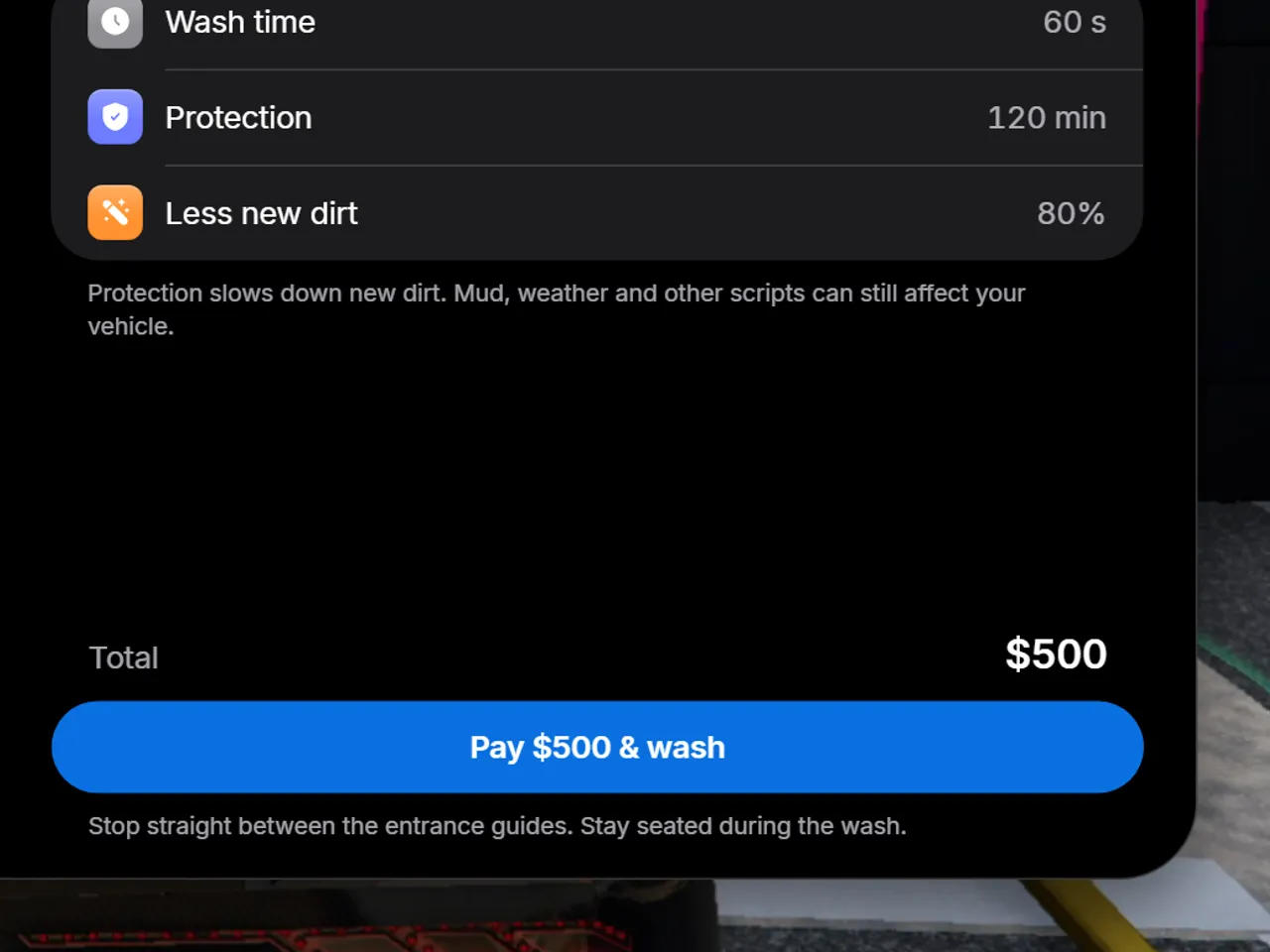
Pick a program. Basic, Comfort and Premium, each with its own wash time, protection and price. The menu first checks that your lane is ready.
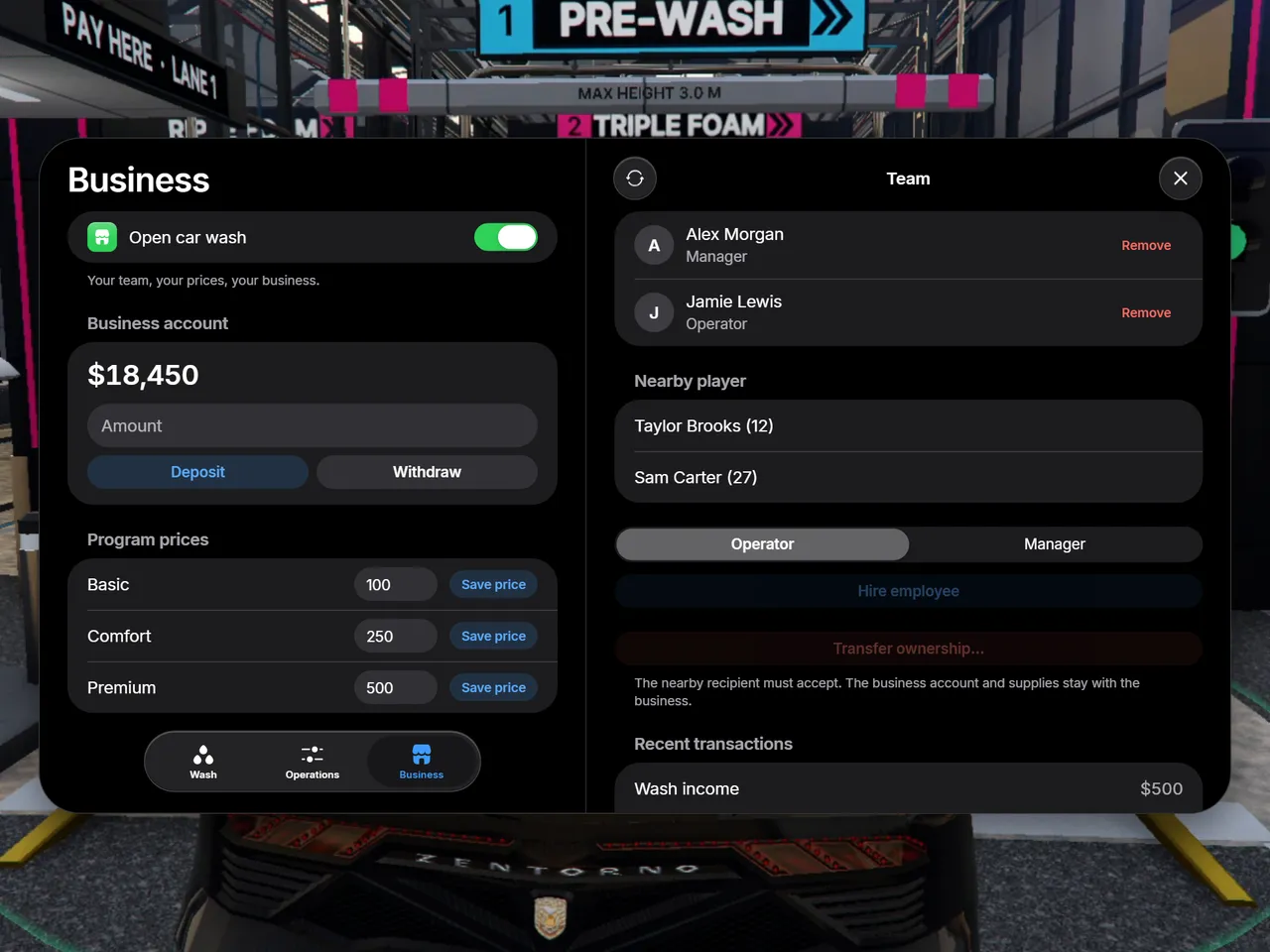
Run the business. Open or close the car wash, set the price of each program, deposit and withdraw cash, hire operators and managers, and hand ownership to another player.
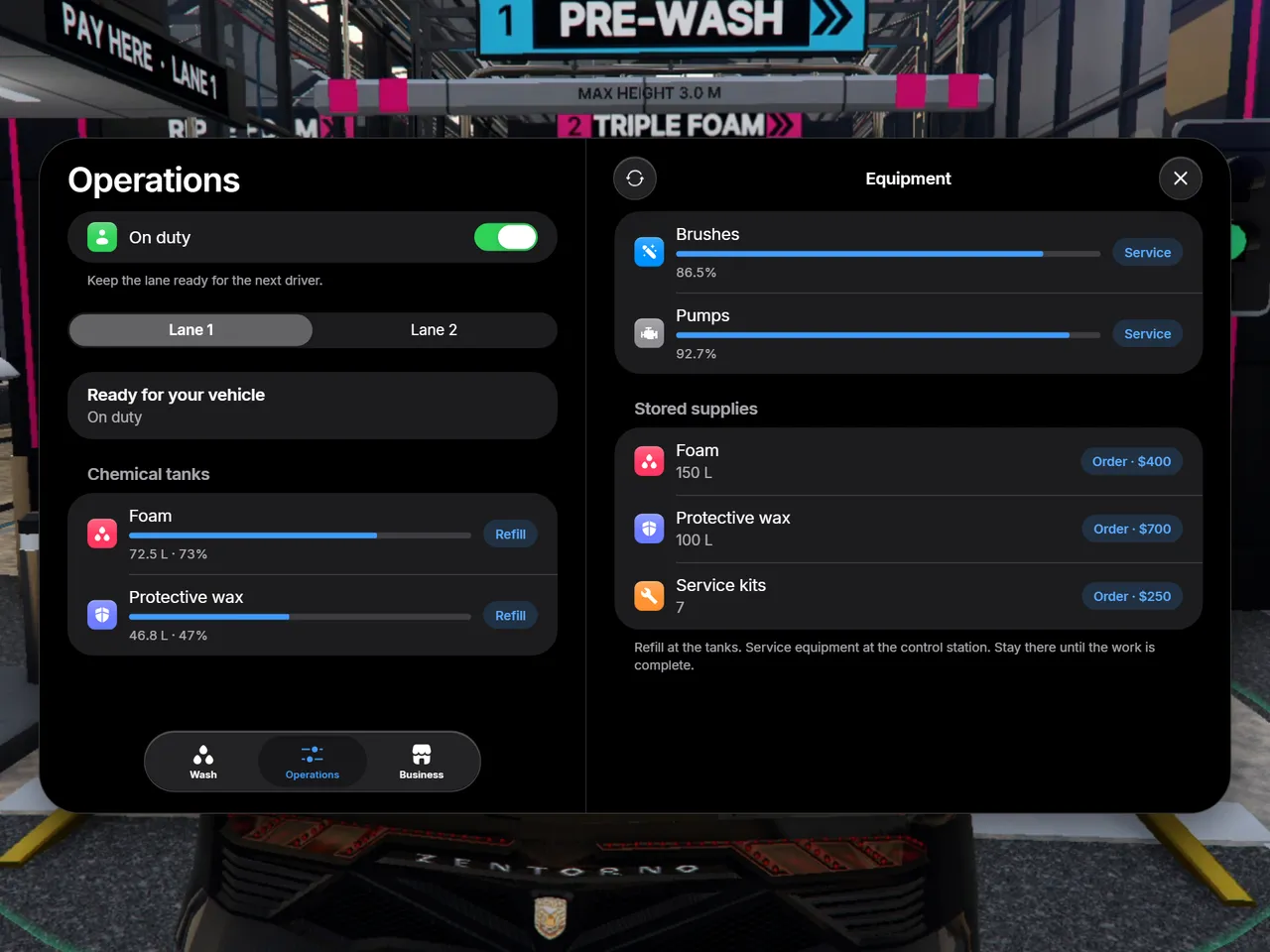
Keep it running. Every wash uses foam and wax and wears the machines. Refill the tanks, service brushes and pumps with kits, and order supplies.
Capture, prewash, foam, side and roof brushes that wrap the vehicle, rinse, protective finish and drying, in every program.
Basic, Comfort and Premium: 30, 45 or 60 seconds, with foam in their own colours. Comfort and Premium add underbody jets, Premium a wax sparkle.
15, 45 or 120 minutes of protection that slows new dirt. It is saved for owned vehicles and restored when the driver gets back in.
The menu checks that your lane is ready, and a blocked lane or exit cannot be booked.
Backspace cancels a running wash, and a paid wash that is cancelled or interrupted is refunded once.
Arched portals, a lit hall, a machine for every station, a vacuum canopy, pay terminals and a tall pylon sign.
Every paid wash goes into the business account. Keeping the machines running is part of the job.
Buy the car wash, set the price of each program, open or close it, deposit and withdraw cash, and hand ownership to another player.
Hire nearby players as operators or managers. Staff on duty can start reserved washes for customers.
Refill the tanks at the yard, service brushes and pumps with kits, and order supplies.
Sell it to a player, or run it as a framework job: access follows job grades and duty, and income goes to the society account.
Every money action is journaled. Uncertain bank calls are never repeated automatically.
Frameworks
With OneSync and oxmysql. Qbox also uses its existing ox_lib.
World map
A separate download on the Cfx.re Portal, shared by every RoadShop map.
Database
The tables are created at startup. A manual install file is included.
Location
Replaces the game's car wash: disable other car wash scripts or maps that use the same place.
Garages
Garage scripts restore a vehicle's protection with one export after it spawns.
Languages
The config, language files and framework bridge are open.
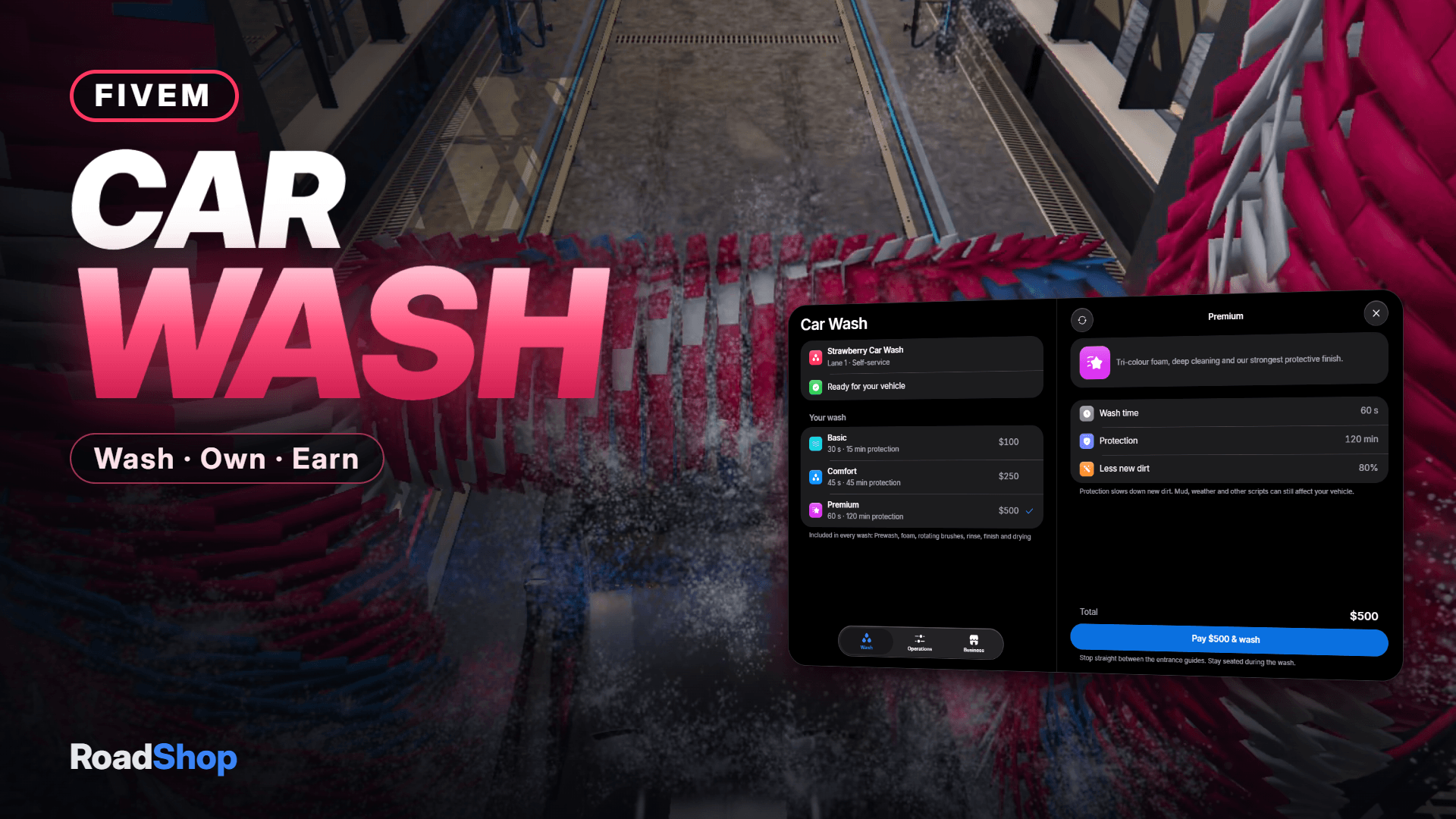
A complete conveyor car wash. Drive in, pick a program and stay seated while foam, brushes and dryers do the work. Then buy the place and run it as your own business.
2 Wash Lanes | 3 Programs | 7 Wash Stations | 3 Frameworks |
The conveyor takes the car through every station while the brushes move around it.
A Real Wash Cycle Capture, prewash, foam, side and roof brushes that wrap the vehicle, rinse, protective finish and drying — in every program. | Three Programs Basic, Comfort and Premium: 30, 45 or 60 seconds, with foam in their own colours. Comfort and Premium add underbody jets, Premium a wax sparkle. |
Lasting Protection 15, 45 or 120 minutes of protection that slows new dirt. It is saved for owned vehicles and restored when the driver gets back in. | Wash Camera & Live HUD An optional camera follows the car through the hall. The HUD shows the current station, cleanliness and the time left. |
Two Lanes Two independent lanes under one roof. A guided entrance marker turns green when the car stands right; blocked lanes cannot be booked. | Free Vacuum Bays Three bays behind the hall. Park, step out and clean the interior with a held nozzle, hose and sound. |
Every paid wash goes into the business account. Keeping the machines running is part of the job.
Buy & Manage Buy the car wash, set the price of each program, open or close it, deposit and withdraw cash, and hand ownership to another player. | Hire a Team Hire nearby players as operators or managers. Staff on duty can start reserved washes for customers. |
Tanks, Brushes & Pumps Every wash uses foam and wax and wears the machines. Refill the tanks at the yard, service brushes and pumps with kits, order supplies. | Owned or Job Mode Sell it to a player, or run it as a framework job: access follows job grades and duty, income goes to the society account. |
| Map Rebuilt car wash at Strawberry with arched portals, a lit hall, a machine for every station, a vacuum canopy, pay terminals and a tall pylon sign. Safe payments Every money action is journaled. Interrupted paid washes are refunded once; uncertain bank calls are never repeated automatically. | Requirements ESX, QBCore or Qbox · OneSync · oxmysql Included English and German · database tables install themselves · exports for garages to restore protection Open files Config, locales and the framework bridge |
It is delivered right away to the Cfx.re account you sign in with. Download it any time from the Cfx.re Portal.
FiveM resources belong to a Cfx.re account, so you sign in before the first item goes into your basket. Use the account that owns your server's license key.
Transfer it in the Cfx.re Portal to the right account. A transfer cannot be undone, so check the username first.
Yes, for most products: press the gift button next to the buy button and enter the recipient's Cfx.re username.
Checkout is operated by Tebex Limited, the merchant of record, who handles product fulfilment, billing support and refunds.
Taxes are calculated at checkout.
Join our Discord and tell us what is going wrong. Our team helps you there. Join our Discord
Loading your basket…