
RoadWatch
Loading price
The bank your server runs on.
Checking, savings, shared and business accounts, transfers, debit cards with a PIN, ATMs, loans with a credit score, invoices and standing orders, in one clean interface your players actually want to open.
Loading price
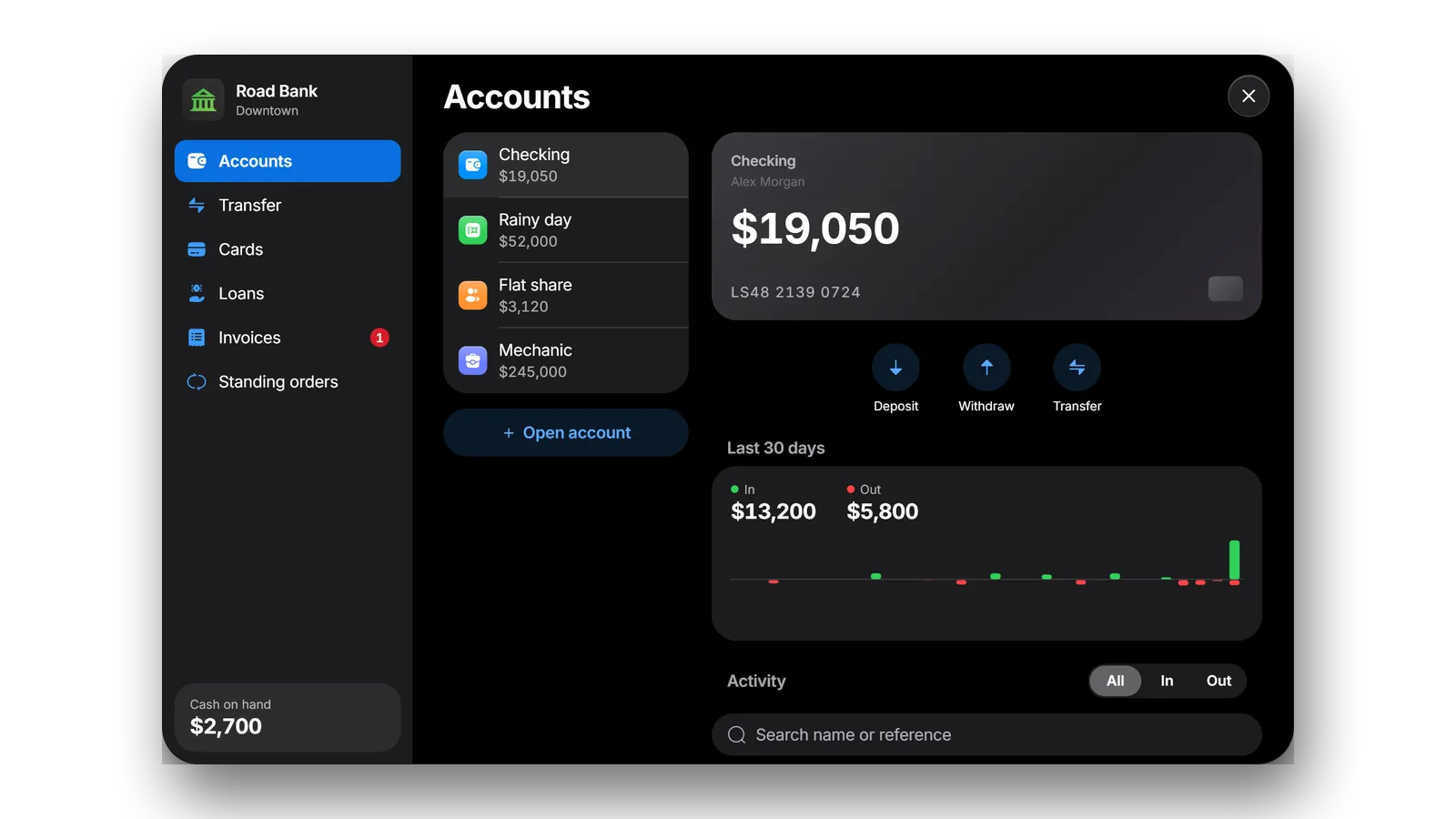
Every script keeps paying. The checking account is the player's framework bank balance, so every script that pays wages, fines or sales keeps working without changes. Each booking lands on top of the activity list.
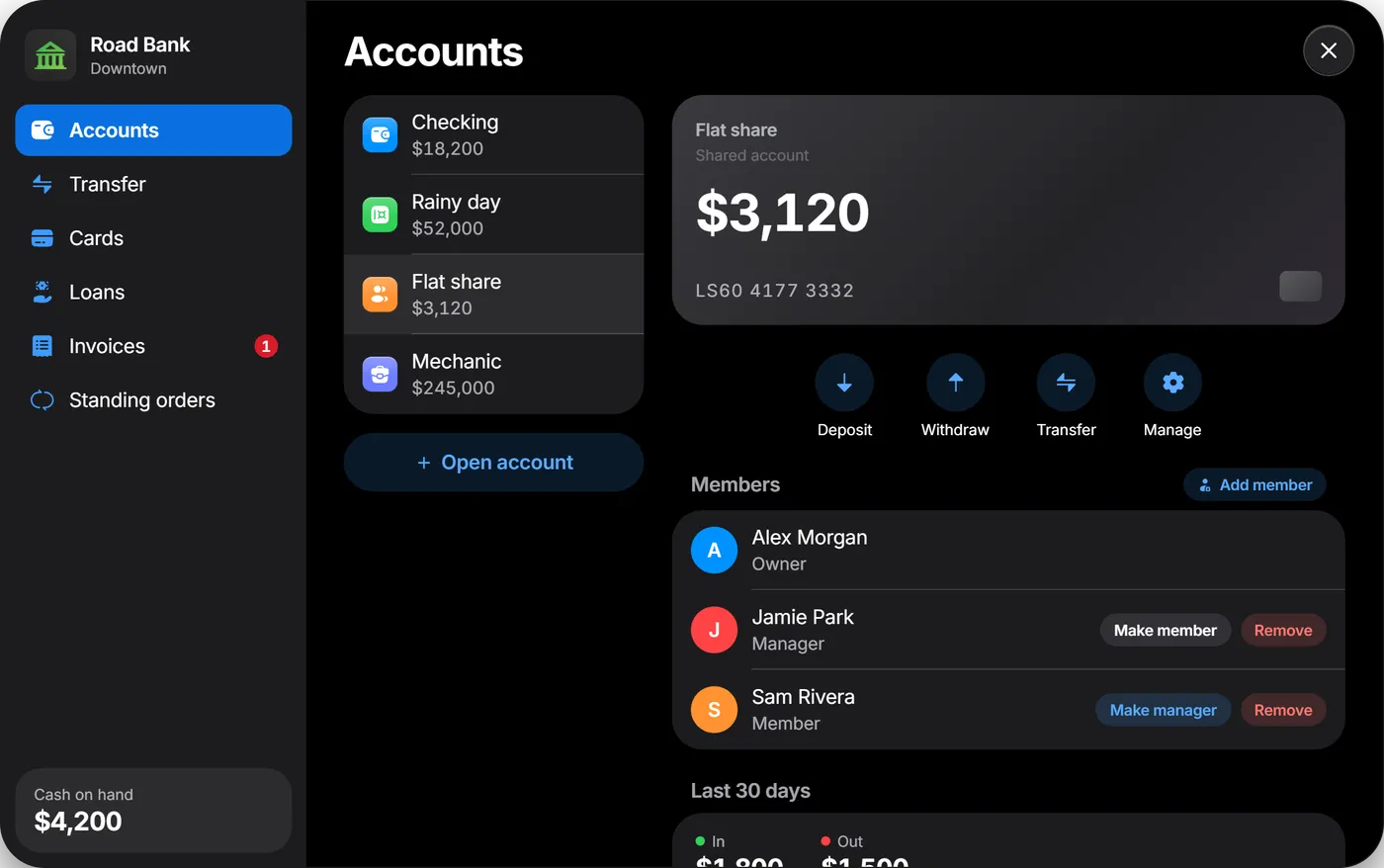
Every kind of account. Savings accounts earn interest on a schedule you set. Shared accounts have owners, managers and members, each with their own rights. On business accounts, job grades decide who can view and who can pay out, with your existing society money or a balance of their own.
Transfers that catch typos. Transfers go by account number. A built-in check digit catches typos, the recipient's name shows before anything moves and a review step shows exactly what is about to be sent. Money sent to an offline player is there the moment they log in.
History at a glance. Every account keeps its history with search, a money-in and money-out filter and a 30-day chart.
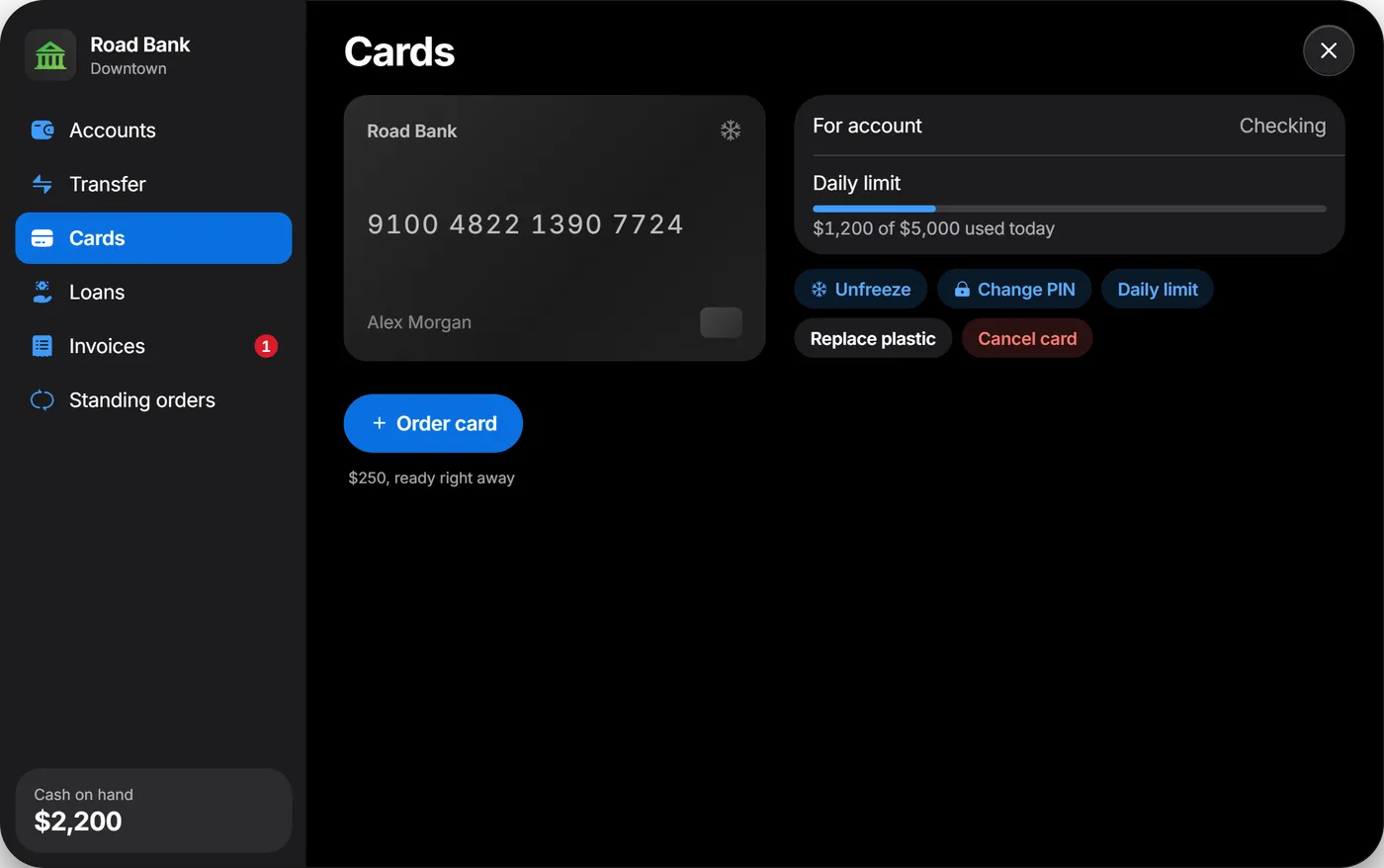
A debit card with a PIN. Players order a debit card with a four-digit PIN, freeze it, set a daily limit, change the PIN or replace the card. With an inventory that supports item metadata, cards are real items, so a found card plus its PIN works at any ATM. Without one, the card is bound to the player.
Cash at any ATM. Insert the card, enter the PIN and take the cash. Too many wrong PINs block the card. Cash also goes in and out at the bank counter.
A credit score that means something. Every player has a credit score from 300 to 850, built from account age, repaid loans, savings and regular activity. A better score unlocks bigger loans at lower rates. Interest, installment and total show before they sign; installments are collected automatically, and a missed one adds a late fee and lowers the score.
Invoices · Standing orders
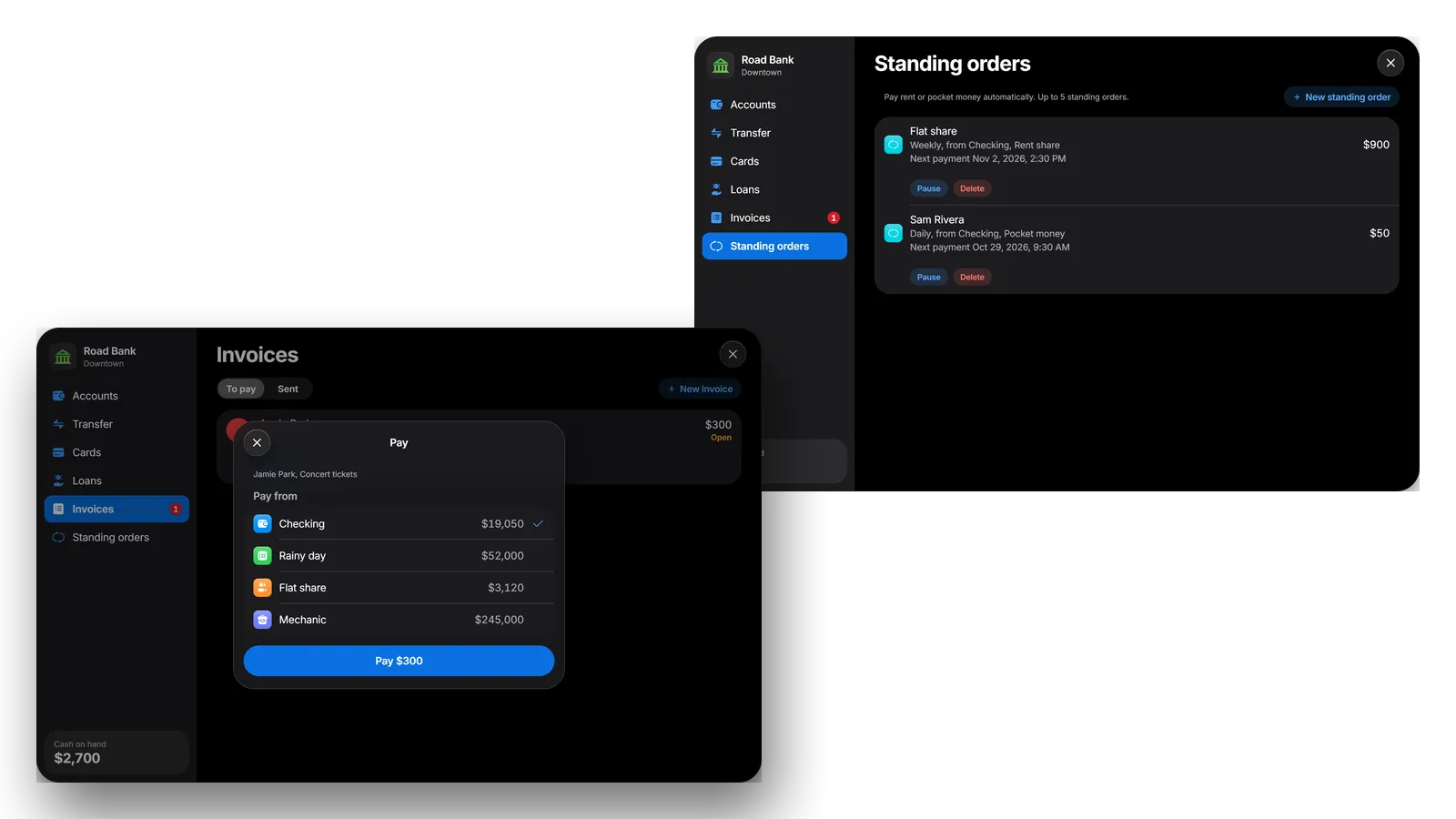
Bill the player standing next to you, privately or from a business. They pay from any account they may use, or decline, and other scripts can send invoices too. Standing orders pay rent and pocket money daily, every three days or weekly, and players see and cancel them in one list.
Every booking runs on the server, is processed one at a time per account and carries a one-time operation id, so a double click never pays twice.
All money movements land in one ledger.
Large movements can be posted to an audit log through a Discord webhook.
Look up, freeze, unfreeze, credit or debit any account, in game or from the server console.
Frameworks
ESX Legacy, QBCore, Qbox or no framework at all.
Interaction
ox_target or qb-target, or a key press at the counter and the ATM.
Branches & ATMs
Set up with a teller and a map blip, the standard ATM models included. Add or move them in the config.
Business money
esx_addonaccount, qb-management, qbx_management or qb-banking, or a balance of its own.
Config
Fees, transfer and account limits, interest, card fee and daily limits, loan tiers and rates, invoices and standing orders.
Exports
Read balances and accounts, add or remove money, transfer, write history lines, send invoices and read the credit score.
Server
The database tables are created on the first start. Config and locales are open.
Optional
ox_target or qb-target, and an inventory with item metadata for card items. Replace other banking scripts that also open ATMs or bank counters.
Languages
Every text in open locale files. Copy one to add your own language.
Good to know
Checking accounts can only be charged while their owner is online, so installments and standing orders from them wait until the owner is back. Standalone servers have no cash, so deposits and withdrawals are hidden there.
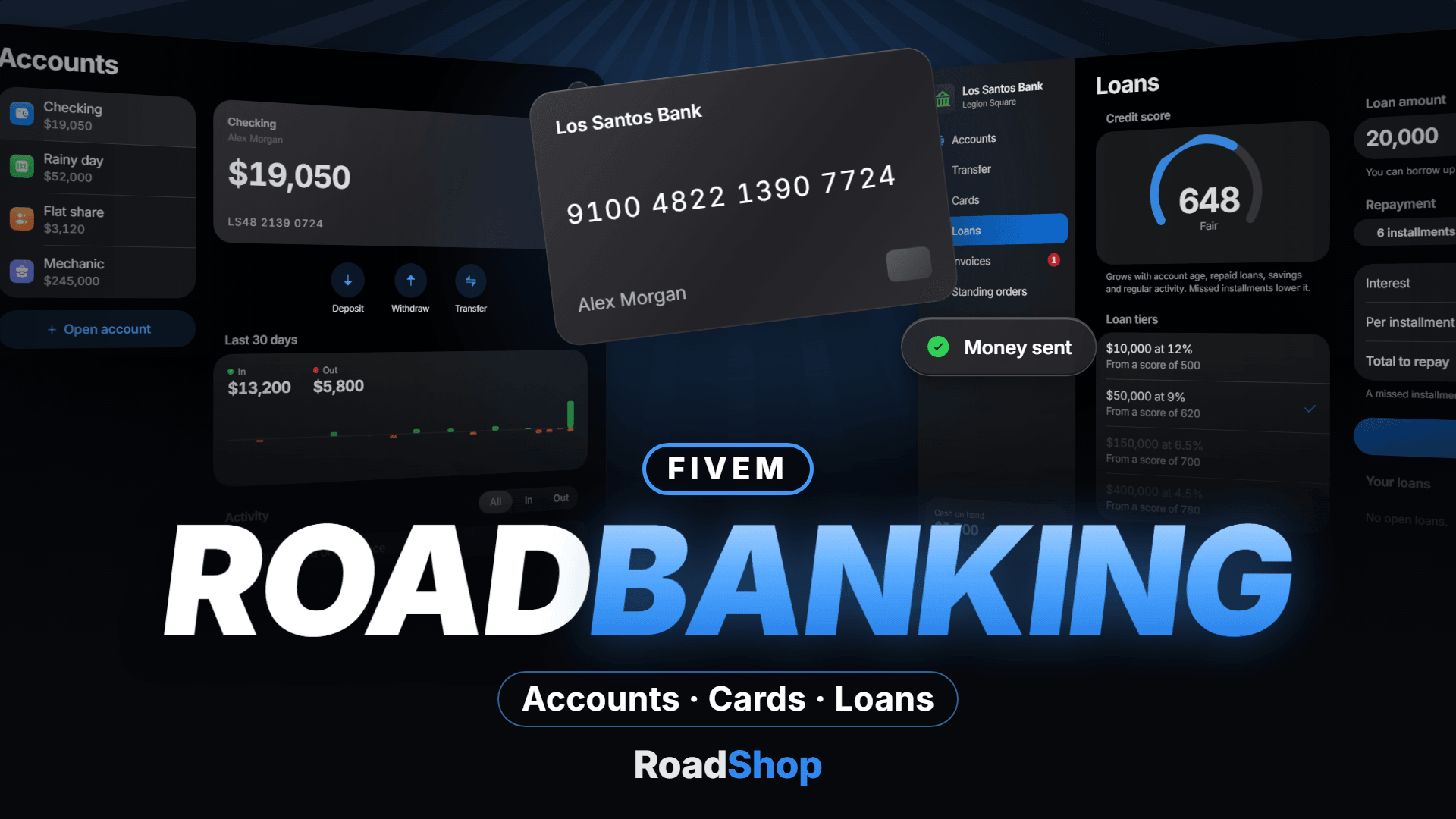
A complete bank for your server. Checking, savings, shared and business accounts, transfers, bank cards with a PIN, ATMs, loans with a credit score, invoices and standing orders, in one clean interface your players actually want to open.
4 Account Types | 8 Branches Set Up | 4 Frameworks | 2 Languages |
The checking account is the player's framework bank balance, so every script that pays wages, fines or sales keeps working without changes.
Checking Balance, account number, quick actions for deposit, withdrawal and transfer, and a 30-day overview of money in and out. | Savings Savings accounts earn interest on a schedule you set, with a rate and a balance cap you choose. |
Shared Accounts For flat shares, couples and crews: owners, managers and members, each with their own rights. | Business Accounts Job grades decide who can view and who can pay out, the boss always has full access. Uses your existing society money or its own balance. |
Transfers go by account number. A built-in check digit catches typos, the recipient's name is shown before anything moves, and a review step shows exactly what is about to be sent. Money sent to an offline player is there the moment they log in. Every account keeps its history with search, a money-in / money-out filter and a 30-day chart. Cash goes in and out at the bank counter or at any ATM.
Players order a debit card with a four-digit PIN. They can freeze it, set a daily limit, change the PIN or replace the card. At the ATM they insert the card, enter the PIN and take the cash; too many wrong PINs block the card. With an inventory that supports item metadata (ox_inventory, qb-inventory and others) cards are real items, so a found card plus its PIN works at any ATM. Without one, the card is bound to the player.
Every player has a credit score from 300 to 850, built from account age, repaid loans, savings and regular activity. A better score unlocks bigger loans at lower rates. Players see the interest, the installment and the total before they sign. Installments are collected automatically, and a missed one adds a late fee and lowers the score. Loan tiers, rates, terms and fees are yours to set.
Invoices Bill the player standing next to you, privately or from a business. They pay from any account they may use, or decline. Other scripts can send invoices too. | Standing Orders Rent and pocket money on autopilot: daily, every three days or weekly. Players see and cancel them in one list. |
Every booking runs on the server, is processed one at a time per account and carries a one-time operation id, so a double click never pays twice. All money movements land in one ledger. Large movements can be posted to an audit log through a webhook, and admins can look up, freeze, unfreeze, credit or debit any account with one command.
| Frameworks | ESX Legacy, QBCore, Qbox or standalone |
| Interaction | ox_target or qb-target, or a key press at the counter and the ATM |
| Branches & ATMs | Eight branches set up with a teller and a map blip, the standard ATM models included; add or move them in the config |
| Business money | Your existing society money (esx_addonaccount, qb-management, qbx_management, qb-banking) or a balance of its own |
| Config | Fees, transfer limits, account limits, interest, card fee and daily limits, loan tiers and rates, invoices and standing orders |
| Exports | Read balances and accounts, add or remove money, transfer, write history lines, send invoices and read the credit score from your own scripts |
| Languages | English and German included, every text in open locale files |
Server oxmysql, ox_lib and OneSync. ESX Legacy, QBCore, Qbox or no framework. The database tables are created on the first start. Config and locales are open. | Optional ox_target or qb-target, and an inventory with item metadata for card items. Replace other banking scripts that also open ATMs or bank counters. |
Standalone servers have no cash, so deposits and withdrawals are hidden there; transfers, cards and loans work. Checking accounts can only be charged while their owner is online, so installments and standing orders from them wait until the owner is back.
It is delivered right away to the Cfx.re account you sign in with. Download it any time from the Cfx.re Portal.
FiveM resources belong to a Cfx.re account, so you sign in before the first item goes into your basket. Use the account that owns your server's license key.
Transfer it in the Cfx.re Portal to the right account. A transfer cannot be undone, so check the username first.
Yes, for most products: press the gift button next to the buy button and enter the recipient's Cfx.re username.
Checkout is operated by Tebex Limited, the merchant of record, who handles product fulfilment, billing support and refunds.
Taxes are calculated at checkout.
Join our Discord and tell us what is going wrong. Our team helps you there. Join our Discord
Loading your basket…