Casino app for RoadPhone Pro
Loading price
Your ride. No driver.
A custom app for RoadPhone Pro. Players book a RoadCab, see the price before they pay and watch it drive to them on a live map. Then they take the passenger seat and get driven to their destination with nobody at the wheel.
Loading price
Its own car, included. Every ride comes in the RoadCab: a two-seat driverless cab with butterfly doors and no steering wheel. The resource streams it, so there is no vehicle pack to install.
A real car picks you up. The RoadCab appears on a road nearby, drives to the kerb next to the player and waits there with its hazard lights on. The enter key opens the passenger door.
Through normal traffic. The car stops for cars, pedestrians and red lights and pulls over at the kerb closest to the destination. A car that gets stuck backs up and finds its way again on its own.
The app on the car's screen. The centre display runs the same app as the phone. Press E, point and click to follow the map, change the destination, switch the driving style or the radio and pull over. A change on one screen shows on the other within seconds.
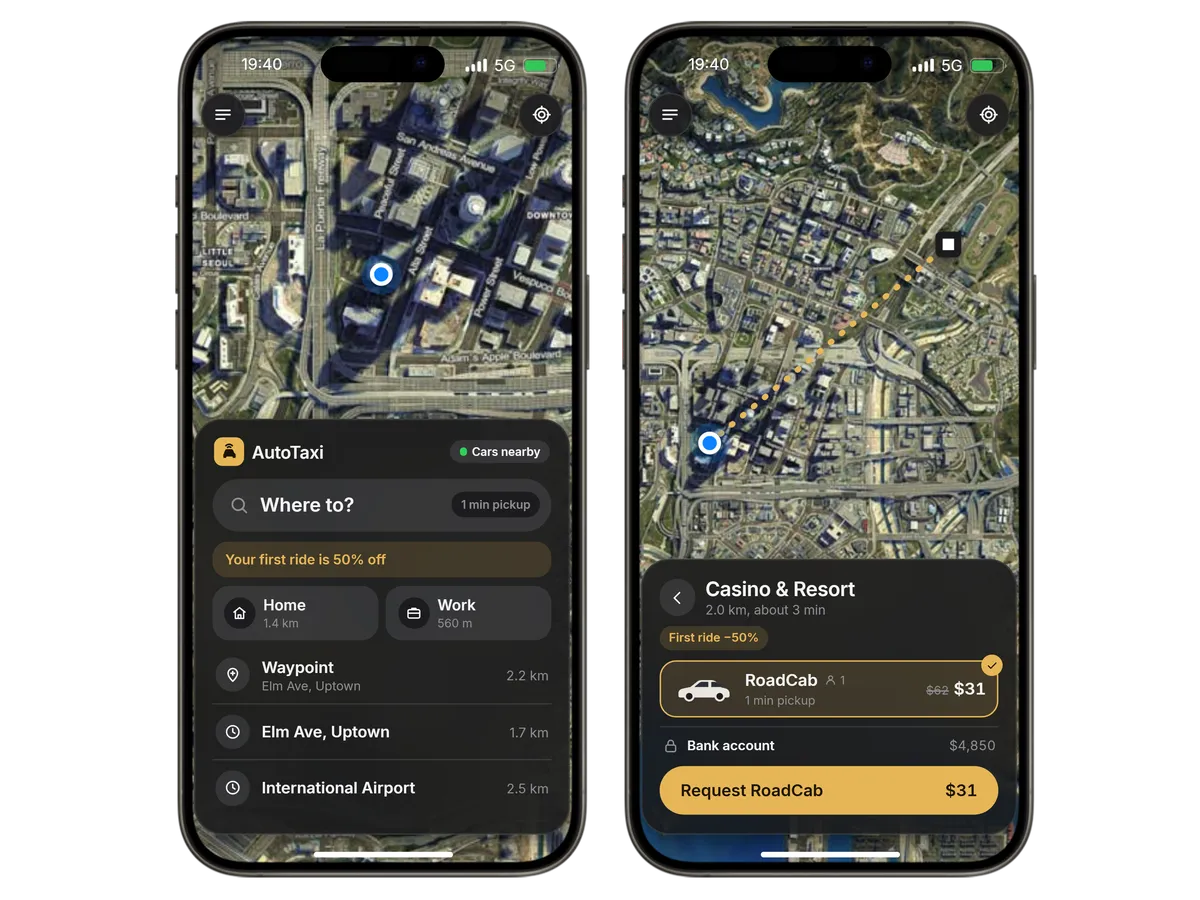
Prices before you book. Search saved places, popular destinations, recent trips and the map waypoint. Fare, pickup time, trip time and the bank balance show before the player books, and a character's first ride is cheaper.

Live tracking. The car moves on the map with its ETA and a journey bar. Honk and flash the lights to find it, change the destination mid-ride, pull over early or share the trip with a contact.
Receipts · Activity
A receipt with the route, star rating and feedback after every ride. The activity list shows every trip with totals for rides, distance, money spent and average rating.
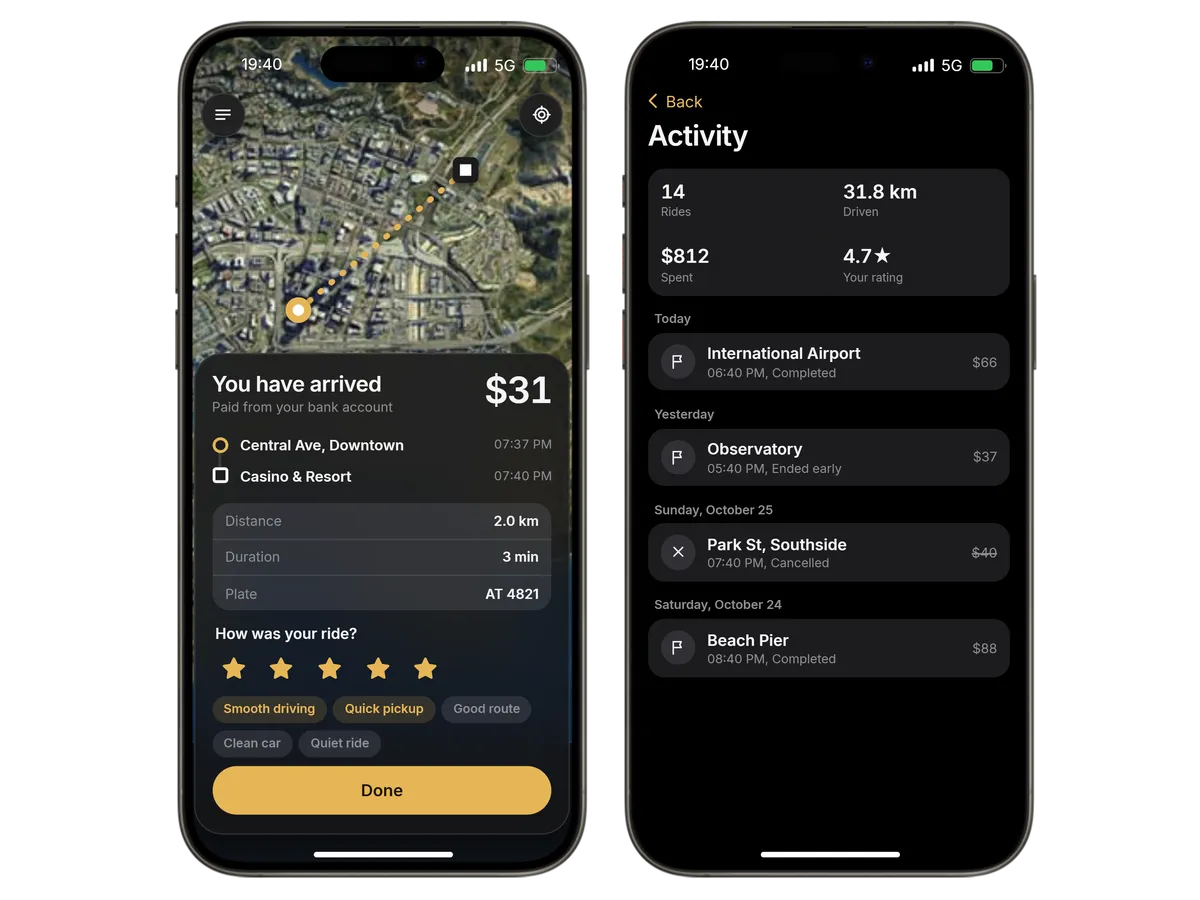
A map-first app in the RoadPhone look, in light and dark mode, with the booking panel always one tap away.
Search saved places, popular destinations, recent trips and the map waypoint, or drop a pin anywhere on the map.
Honk, flash the lights, lock and unlock, pull over early, change the destination, switch between standard and relaxed driving and change the radio station.
Send pickup, destination, car and plate to a contact as a phone message, straight from the ride screen.
A Live Bar card shows the ride's progress with a cancel button, and a blip marks the car in the game.
Home, work and your own saved places. Driving style and radio are remembered for every new ride.
One app for every RoadPhone. On the open Fold and in landscape the booking panel sits beside the map.
The fare is paid from the bank account when the ride is booked. Every price and refund is worked out on the server and shows up in the RoadPhone bank app.
Cancelling shortly after booking costs nothing.
A ride that ends early costs only the distance driven.
Changing the destination charges or refunds the difference.
A car that fails before the pickup is refunded in full.
Fares rise while most cars are out.
A character's first ride is cheaper.
Prices
Base fee, price per km, minimum fare, cancel fee, free cancel window, busy pricing and the first-ride discount.
Vehicle
Its price multiplier and paint, plus its open handling and vehicle data.
Fleet
Cars on the road at once, cooldown between requests, driving speeds, pickup waiting time and a visible or hidden driver.
Taxi drivers
Optionally no driverless rides while enough players with the taxi job are on duty.
Destinations
The popular destinations in the search are yours to set.
Integration
Server exports to read or cancel a player's ride, a hook after every finished ride and an open money bridge if you pay from somewhere else.
Custom app
Custom apps are part of RoadPhone Pro. Use the latest version; AutoTaxi runs on the RoadPhone and the RoadPhone Fold.
Server
With OneSync and mysql-async or oxmysql. No extra libraries, and the database tables are created on start.
Languages
Config, locales, the money bridge and the vehicle data are open.
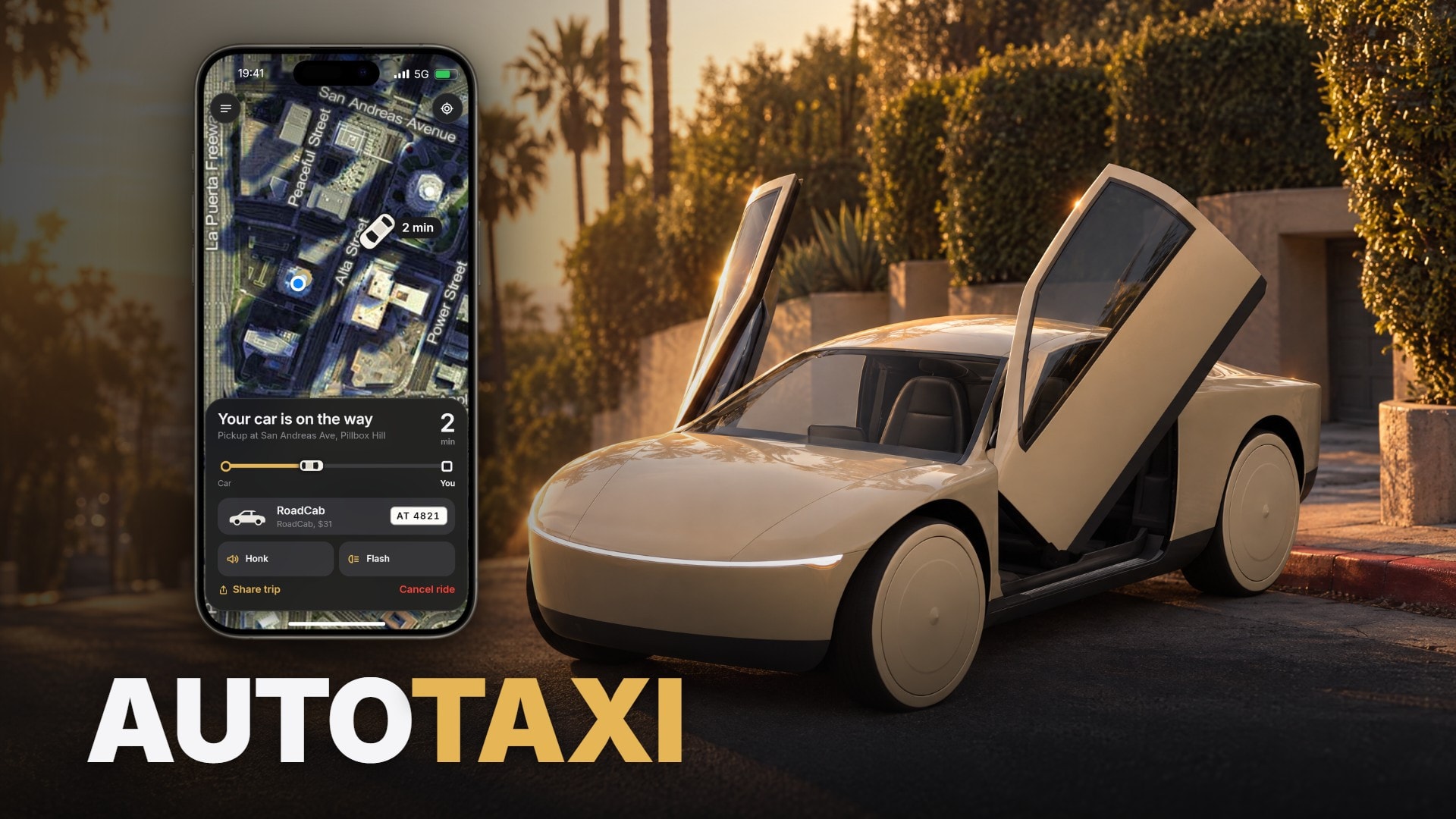
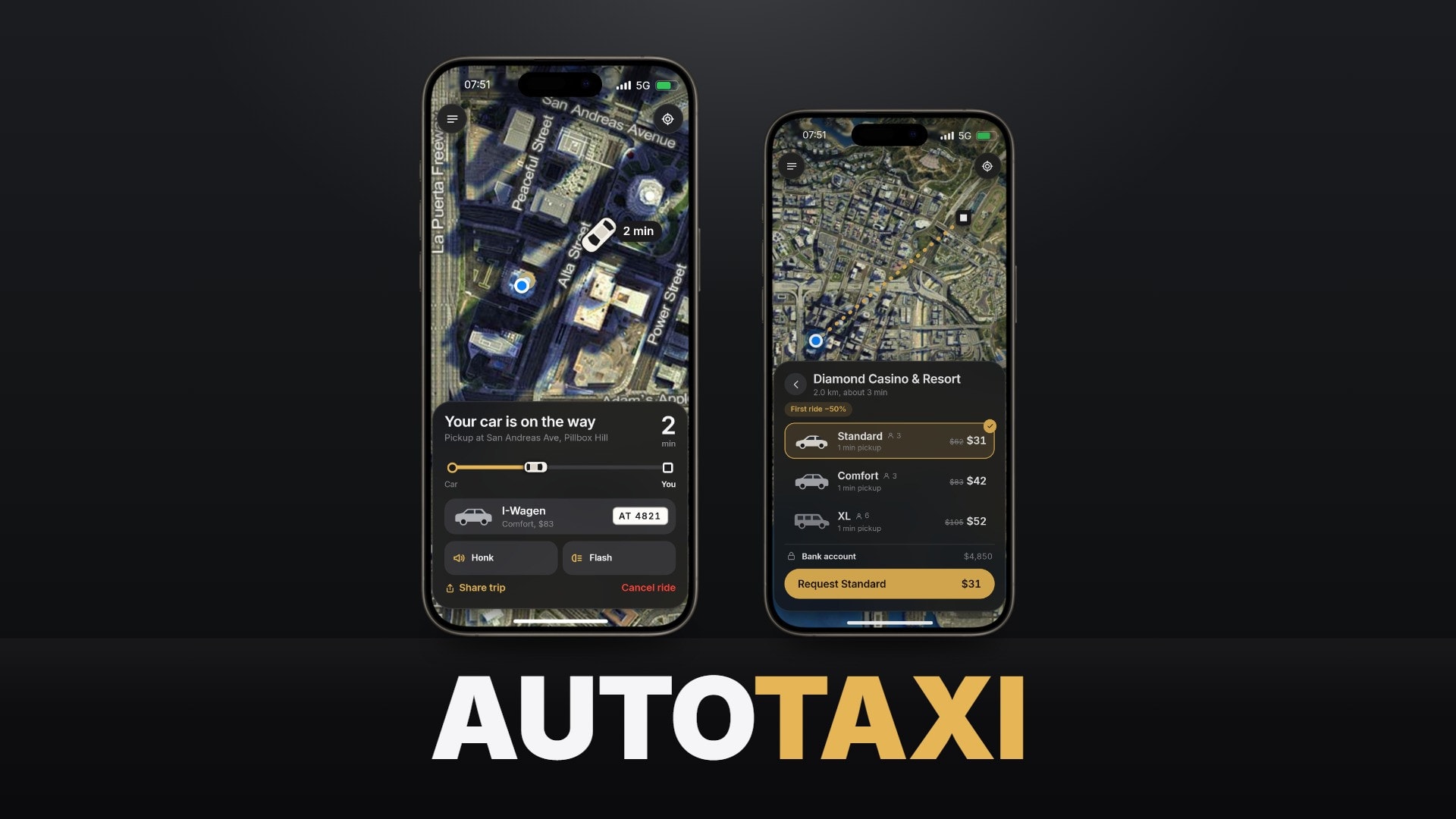
Driverless rides for your city. Players book a RoadCab in the phone app, see the price before they pay and watch it drive to them on a live map. They take the passenger seat and get driven to their destination with nobody at the wheel, while the same app runs on the car's own screen.
2 Screens | 10 Popular Destinations | 3 Frameworks | 2 Languages |
Every ride comes in the RoadCab: a two-seat driverless cab with butterfly doors and no steering wheel, made for AutoTaxi. The resource streams it, so there is no vehicle pack to install. Its paint is set in the config, and its handling and vehicle data stay open for you to tune.
The RoadCab appears on a road nearby, out of the player's sight where it can, drives to the kerb next to the player and waits there with its hazard lights on. The enter key opens the passenger door. Once the passenger is inside, the car drives through normal traffic, stops for cars, pedestrians and red lights, and pulls over at the kerb closest to the destination. Then it drives off and disappears. A car that gets stuck backs up when the lane behind it is clear and finds its way again on its own.
The RoadCab's centre display runs the same app as the phone. Press E, point at the screen and click: follow the map, change the destination, switch the driving style, change the radio, pull over and rate the ride at the end. Phone and screen show the same ride, so a change on one appears on the other within seconds. Players can rebind the key in the game settings.
A map-first app in the RoadPhone look, in light and dark mode, with the booking panel always one tap away.
Map-First Booking Search saved places, popular destinations, recent trips and the map waypoint, or drop a pin anywhere on the map. | Prices Before You Book Fare, pickup time, trip time and the bank balance before the player books. Fares rise while most cars are out, and a character's first ride is cheaper. |
Live Tracking The car moves on the map with its ETA and a journey bar from pickup to destination. A blip marks it in the game, and a Live Bar card shows the progress with a cancel button. | Car Controls Honk and flash the lights to find the car, lock and unlock it, pull over early, change the destination mid-ride, switch between standard and relaxed driving, and change the radio station. |
Share Your Trip Send pickup, destination, car and plate to a contact as a phone message, straight from the ride screen. | Receipts & Activity A receipt with the route, star rating and feedback after every ride. The activity list shows every trip with totals for rides, distance, money spent and average rating. |
Places & Preferences Home, work and your own saved places. Driving style and radio are remembered for every new ride. | RoadPhone Fold One app for every RoadPhone. On the open Fold and in landscape the booking panel sits beside the map. |
The fare is paid when the ride is booked. Cancelling shortly after booking is free. A ride that ends early costs only the distance driven, a new destination charges or refunds the difference, and a car that fails before the pickup is refunded in full. Every price and refund is worked out on the server and shows up in the RoadPhone bank app.
| Prices | Base fee, price per km, minimum fare, cancel fee, free cancel window, busy pricing and the first-ride discount |
| Vehicle | The RoadCab's price multiplier and paint, plus its open handling and vehicle data |
| Fleet | Cars on the road at once, cooldown between requests, driving speeds, pickup waiting time, visible or hidden driver |
| Taxi drivers | Optionally no driverless rides while enough players with the taxi job are on duty |
| Destinations | Your own list of popular destinations in the search |
| Integration | Server exports to read or cancel a player's ride, a hook after every finished ride, and an open money bridge if you pay from somewhere else |
RoadPhone Pro Custom apps are part of RoadPhone Pro. Use the latest version. AutoTaxi runs on the RoadPhone and the RoadPhone Fold. | Server ESX, QBCore or Qbox with OneSync and mysql-async (or oxmysql). No extra libraries, and the RoadCab is streamed by the resource. The database tables are created on start. Config, locales (English, German), the money bridge and the vehicle data are open. |
It is delivered right away to the Cfx.re account you sign in with. Download it any time from the Cfx.re Portal.
FiveM resources belong to a Cfx.re account, so you sign in before the first item goes into your basket. Use the account that owns your server's license key.
Transfer it in the Cfx.re Portal to the right account. A transfer cannot be undone, so check the username first.
Yes, for most products: press the gift button next to the buy button and enter the recipient's Cfx.re username.
Checkout is operated by Tebex Limited, the merchant of record, who handles product fulfilment, billing support and refunds.
Taxes are calculated at checkout.
Join our Discord and tell us what is going wrong. Our team helps you there. Join our Discord
Loading price
Loading price
Loading price
Loading your basket…